How it works
Hymn & Hue runs the whole lifecycle of an arts ministry. Your artists submit, your leaders approve, and the gallery, the cards, and the archive take care of themselves.
Step one · Submit
You share one link, and artists submit on their own time from any phone or computer, so you are not gathering photos from a pile of separate emails, texts, and GroupMe messages. They open the link, choose the kind of work they are sharing, and the form fits itself to that: visual art, poetry or prose, or a song. Every piece takes a photo, a title, the inspiration scripture or theme, a short caption that fits the printed card, and an optional longer description for the website. For a song, an artist can also add a recording of the song, sheet music and lead sheets for the musicians, and a link to a music video if they have one. They can mark a piece for sale with a price and note, add an optional spoken reflection, and acknowledge your statement of faith, all in a single form.


Step two · Curate
Every submission lands in a review queue. A leader can approve it, hide it, edit the details, or set it aside. Curate-before-public is a hard rule, not a setting you can forget to turn on. Artist contact information is never shown publicly.
Step three · Publish
Approved pieces appear in your public gallery, grouped by campus and sermon series. Visitors read the artist's statement, see the inspiration scripture behind the piece, and can listen to an optional recorded reflection. If a piece is for sale, the price and a contact path appear without ever exposing the artist's private details.


Step four · Print cards
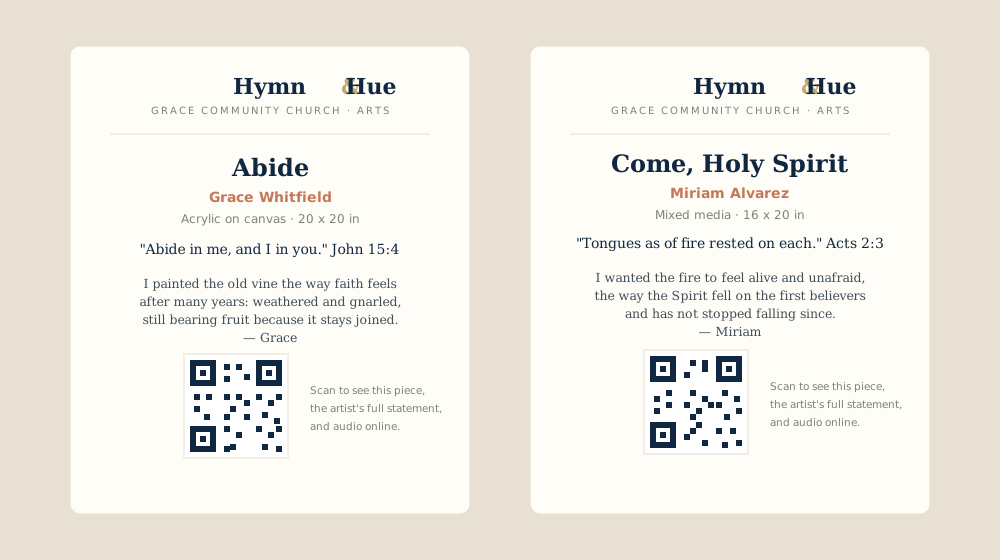
Hymn & Hue generates identification cards for each piece, in the size you choose, with your church logo, the piece details, and a QR code that opens that artwork online. Print them on plain letter paper, or send the batch to a print shop. A visitor scans the code and lands on the piece, the description, and the artist's audio.
Step five · Archive
When a series comes down, it does not disappear. Past artworks are kept for good, so visitors can revisit past collections and every artist keeps a record of what they have made. Bring a piece back into a current display any time you like.


Common questions
The operational questions leaders ask us most. For questions about the product, pricing, and policies, see the full FAQ.
You share one link. Each artist opens it on a phone or computer, chooses the kind of work they are sharing (visual art, poetry or prose, or a song), and the form fits itself to that. They add a photo, a title, the inspiration scripture or theme, a short caption for the printed card, and an optional longer description. There is no app to download and no account to create.
Every submission lands in a review queue. A leader can approve it, edit the details, hide it, or set it aside, and nothing appears publicly until someone approves it. Curate before public is a hard rule in Hymn & Hue, not a setting you can forget to turn on.
Create a series or theme, set its due date, and share the submission link with your congregation. Hymn & Hue drafts the reminder message for you to send through your usual channels, such as email or GroupMe, so artists know what the theme is and when submissions close.
Yes. Hymn & Hue generates printable identification cards for every approved piece, each with the artist, the title, the details, and a QR code that opens the piece online, where a visitor can read the artist's statement and hear an optional recording. Cards come in several sizes, from a business card to a full letter or A4 sheet, and print in batches as a PDF for your office.
Each piece is tied to a campus and a series, so you always know what belongs where. When a season ends, its pieces move into a searchable archive, and you can bring a past work back into a current show. Nothing is lost, and you never have to rebuild a record of what you have shown before.
Yes. Add your team with roles (read only, edit, edit and delete, and super admin), and scope any person's access to a single campus. A multisite church can let each campus manage its own gallery while a central leader sees everything.
We will set up a working example for your congregation so your team can click through the whole flow.